The Ultimate Gaming Setup: Build Your Perfect Immersive Gaming Space
You’ve probably stared at your cluttered desk, tangled cables everywhere, a chair that hurts your back after an hour, and thought, there has to be a better way. Whether you’re a casual weekend warrior or someone who games every single day, your environment matters more than you think. The right setup doesn’t just look cool. It actually makes you play better, feel better, and enjoy every session more.
This guide walks you through everything you need to know to build the ultimate gaming setup from scratch, or upgrade what you already have.
The Foundation: Choosing Your Gaming Platform
Before you buy a single peripheral, you need to settle one big question, PC or console?
This isn’t just a preference thing. It’s a decision that shapes everything else you’ll spend money on. Console gaming setup options like PlayStation and Xbox are plug-and-play friendly. You don’t need to worry about specs, drivers, or compatibility. You open the box, connect to your TV, and you’re gaming within minutes. That simplicity is genuinely appealing, especially if you don’t want to dive into the technical side of things.
PC gaming, on the other hand, gives you control that consoles simply can’t match. You can fine-tune your graphics settings, mod your games, upgrade individual gaming PC components over time, and hit frame rates and resolutions that make your jaw drop. Choosing the right gaming platform really comes down to how much control you want and how much time you’re willing to invest in setup and maintenance.
If you go the PC route, your two most critical choices are your high-performance CPU and your gaming GPU options. The CPU handles game logic and system tasks, while the GPU renders every frame you see on screen. For most gamers in 2025, pairing a mid-to-high-tier processor with a capable graphics card gives you the sweet spot of price and performance. Custom PC builds are also a fantastic option if you enjoy the process of researching and assembling your own machine. You get exactly what you pay for, with no bloatware or compromises.
For console players, the calculus is simpler but no less important. Think about your TV size, your preferred game library, and whether you care about exclusives. Both platforms can deliver an immersive and efficient gaming space when set up correctly.
Read More: Dual Curved Monitor Setup: Optimize Productivity and Gaming
How to Create the Perfect Gaming Space
Once you’ve locked in your platform, it’s time to design your actual space. This is where things get genuinely fun.
1. Choose the Right Gaming Desk
Your desk is the backbone of your entire setup. Everything sits on it, so getting this wrong creates problems you’ll feel every single session.
Gaming desk size and material matter more than most people realize. A desk that’s too small forces you to cram everything together, which leads to poor ergonomics and constant frustration. Aim for at least 55 inches in width if you’re running dual or multiple monitors. The depth should give your arms a natural resting position without reaching forward uncomfortably.
Look for desks made from sturdy materials like solid wood, steel-frame composites, or thick MDF with a durable surface coating. L-shaped desks are brilliant for gamers who also stream or work from the same space. They give you separate zones for gaming and secondary tasks without eating up more floor space.
2. Get a Comfortable Gaming Chair
Here’s something nobody tells you when you’re starting out: an uncomfortable chair will ruin long gaming sessions faster than any lag spike ever could.
Ergonomic gaming chair features to look for include lumbar support, adjustable armrests, seat height control, and a reclining backrest. Your lower back needs support, especially if you’re sitting for two to four hours at a stretch. Chairs with memory foam padding and breathable mesh backs tend to hold up well over time.
Adjustable gaming chair features aren’t just marketing fluff. Being able to position your chair so your feet rest flat on the floor, your thighs are parallel to the ground, and your eyes are level with the top third of your monitor reduces physical strain significantly. Your body will thank you.
3. Set up Your PC Gaming Monitors
Your monitor is your window into the game. Choose wisely here.
Monitor refresh rate is one of the most important specs to understand. A 144Hz monitor feels dramatically smoother than a 60Hz panel, especially in fast-paced shooters or racing games. If your GPU can push the frames, a 144Hz or even 240Hz display will reduce motion blur and make your gameplay feel more responsive.
Resolution matters too, but it’s a balancing act. A 1440p monitor at 144Hz is arguably the sweet spot for most gamers right now. It looks gorgeous without demanding the monstrous GPU power that 4K gaming requires. Setup dual or triple monitors if you want a wider field of view for simulation games or a dedicated space for chat, streams, or Discord.
Ergonomic monitor placement means positioning your screen so the top of the display sits at or just below eye level. This keeps your neck in a neutral position, preventing that familiar ache after long sessions.
4. Choose the Right Peripherals
Your peripherals are what you actually touch every single moment you’re gaming. Getting these right is essential.
A mechanical gaming keyboard offers tactile feedback that membrane keyboards just don’t replicate. The feel of each keypress is more precise, which genuinely matters during intense gameplay. Different switch types, clicky, tactile, and linear, suit different preferences, so try a few before committing.
Mouse DPI settings are worth understanding too. Higher DPI isn’t always better. Most competitive FPS players actually prefer lower DPI settings with higher in-game sensitivity adjustments for better precision. Find what works for your hand size, grip style, and game genre.
A surround sound headset transforms the audio landscape of your games completely. Footsteps behind you, environmental cues, directional explosions, all of it becomes information you can act on. This is a genuine competitive advantage in multiplayer games. Customizing keyboard and mouse settings, including macros and sensitivity profiles, rounds out your peripheral game nicely.
5. Invest in Good Lighting and Ambiance
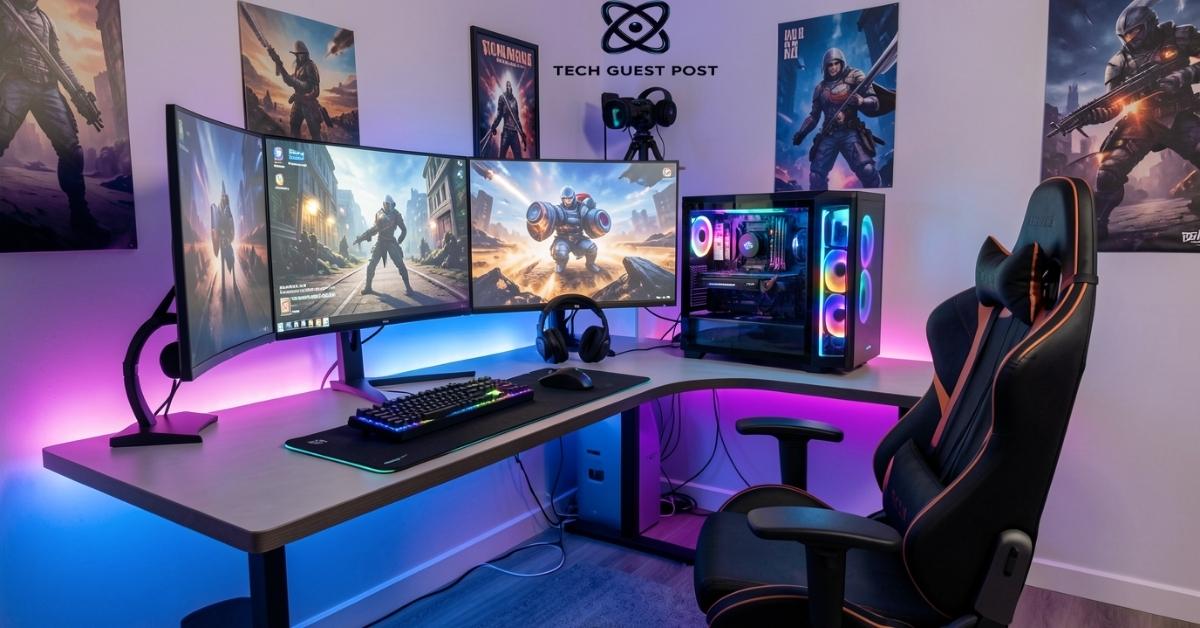
Lighting effects for immersion aren’t just about aesthetics, though they do look incredible in photos and streams. The right lighting setup actually reduces eye strain, keeps you alert longer, and creates a mood that pulls you deeper into the experience.
RGB lighting for gaming has become a whole ecosystem. From keyboard backlighting to LED strips behind your monitor, to smart bulbs that sync with your game’s on-screen colors, the options are staggering. Bias lighting, a soft glow behind your monitor, is particularly effective at reducing the harsh contrast between your bright screen and a dark room. Your eyes will notice the difference immediately.
Keep ambient room lighting warm and dimmable. Harsh overhead fluorescents are your enemy. A few strategically placed LED strips and a smart desk lamp give you full control over your environment’s vibe at any hour.
6. Manage Cables and Organization
Nothing undermines a beautiful setup faster than a nest of cables cascading off the back of your desk like a waterfall of chaos.
Cable management solutions don’t need to be expensive. Cable raceways, velcro ties, under-desk cable trays, and adhesive clips cost very little and make an enormous visual difference. The goal is to route every cable intentionally, power cables down the back of the desk legs, peripheral cables tucked under the desk surface, and as little visible cabling as possible at eye level.
Organize cables efficiently not just for looks, but for practicality too. Clean routing means fewer snags, easier upgrades, and a desk surface you can actually use. Desk accessories for gamers like monitor arms and headset hooks also free up valuable surface real estate.
7. Improve Your Audio Setup
Audio immersion in gaming is criminally underrated. Most people spend thousands on monitors and GPUs but plug in a five-dollar headset and call it a day.
If you want to enhance your gaming experience meaningfully, invest in decent audio. A good surround sound headset, as mentioned earlier, is one option. A dedicated DAC and amplifier setup is another step up for audiophiles who want truly exceptional clarity. Improving audio quality doesn’t require breaking the bank, but it does require prioritizing it.
For streamers and content creators, streaming equipment for gamers like a USB condenser microphone and an audio interface can elevate the quality of your broadcast significantly. Your audience hears your voice clearly, background noise disappears, and the whole production feels more professional.
8. Personalize Your Gaming Setup
This is where your setup stops being a collection of hardware and starts being yours.
Personalize your gaming environment with touches that reflect your taste. Maybe that’s a themed color scheme across all your RGB devices. Maybe it’s gaming memorabilia on shelves behind you, visible during streams. Maybe it’s a custom desk mat featuring your favorite game art, or a specific arrangement of your personal gaming space that just feels right to you.
The goal is to create a space you genuinely want to spend time in. When your setup feels personal and intentional, every session feels better. Don’t underestimate the psychological effect of loving where you game.
Final Thoughts
Building the ultimate gaming setup is a process, not a one-time purchase. You don’t need to do everything at once. Start with the fundamentals, a solid platform, a decent desk and chair, and a good monitor. Then layer in upgrades over time. Better peripherals. Smarter lighting. Cleaner cable management. Richer audio. Each improvement compounds.
The best setup isn’t the most expensive one. It’s the one that fits your space, suits your playstyle, and keeps you comfortable and immersed for hours. Build it thoughtfully, enjoy it fully, and upgrade it gradually. That’s how you build the perfect gaming setup.
FAQ’s
What is the most important part of a gaming setup?
Your chair and monitor matter most for long sessions. Comfort and visual clarity directly affect how long and how well you can play.
How much does it cost to build a good gaming setup?
A solid mid-range setup including desk, chair, monitor, and peripherals can come together for around $800 to $1,500 depending on your choices.
Is PC or console better for a gaming setup?
PC offers more customization and performance potential, while consoles are simpler and more affordable upfront. Both can deliver a great experience.
Does lighting really make a difference in gaming?
Yes, bias lighting behind your monitor reduces eye strain noticeably, and ambient RGB lighting enhances the overall atmosphere of your space.
How do I keep my gaming setup organized?
Use cable management trays, velcro ties, and adhesive clips to route cables cleanly. Monitor arms and headset hooks also free up desk space significantly.

Evan Cole is a tech enthusiast and digital strategist with years of experience in content marketing and SaaS trends. He explores emerging technologies, AI innovations, and SEO-driven growth strategies. Evan’s insights help readers understand complex tech topics through practical examples and real-world applications that inspire smarter digital solutions.